Android developers were able to glimpse Android Studio 2.2 for the first time during Google I/O in May 2016. Months later, in September, programmers were given access to a free version brimming with improvements, a major step forward for this Integrated Development Environment (IDE).
Among the new features were all of the advantages that are part of the Android 7.0 operating system. In other words, developers can create new features for the Android Nougat device from the IDE itself. The following list explains the latest major changes to Android Studio.
1. Improvements to Instant Run
Instant Run is an Android Studio tool that enables developers to apply changes to existing methods and application resources in a running application without having to compile a new APK. In this way, any changes to the code are quickly displayed.
To compile and run an app you only need to click the play (Run) icon. The IDE takes care of the operation via Gradle, a code construction automation tool based on other tools such as Apache Ant and Apache Maven. Gradle launches the running application after requesting a destination for the implementation, either an emulator or a connected device (a cell phone plugged in to the development workstation).
With this new feature in Android Studio 2.2, when programmers click Run or Debug, Instant Run applies the changes in the code and resources to the running application. It interprets changes in a smart way without having to restart the app or to compile the APK (Android Application Package), the component packaging system for the Android platform (e.g. JAR format for Java platforms).
2. Development for Android Nougat
Android developers can include the new expected features for the Nougat 7.0 operating system in their Android Studio programming plan. These new features have an impact on the IDE itself:
● Changes to code finishing: Android Studio includes some new features linked to the way programmers encode, structure, compile and run code that go beyond the changes in Instant Run. Here are some of examples of the advances in this IDE from version 2.2: integration of code and GitHub templates to help developers compile common app functions and import specific examples of code; integration of Lint to detect performance and compatibility issues within the code; improved emulator performance and compatibility with C++ and NDK; and support for Google Cloud Platform, which facilitates integration with Google Cloud Messaging and App Engine.
● Redesign of notifications: as it happened with iOS 10, notifications for Android devices have changed. The operating system is now equipped with new templates, grouped notifications, direct response on the alerts themselves and new customized views from two APIs.
● Customization of Quick Settings: after Android 7.0, developers can use an API to create quick access tiles for key features within third-party apps. After Android Studio 2.2., this customization is included within the IDE.
3. Changes linked to design
Android Studio 2.2 and successive versions included some changes and improvements to the way developers handle aspects linked to design or users interact with the applications’ graphic interface:
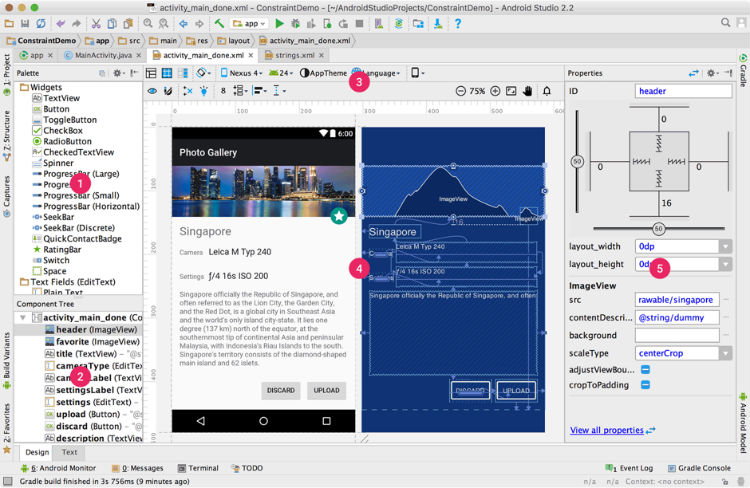
● Design editor: creating interfaces is simpler than before after Android Studio 2.2. Using the new panel it is possible to adjust the visual attributes of each widget in a less traumatic fashion. In the IDE design editor, programmers can compile as many designs as they wish by dragging widgets to a visual editor without having to write the XML code manually. It is compatible with Android 2.3 and successive versions.
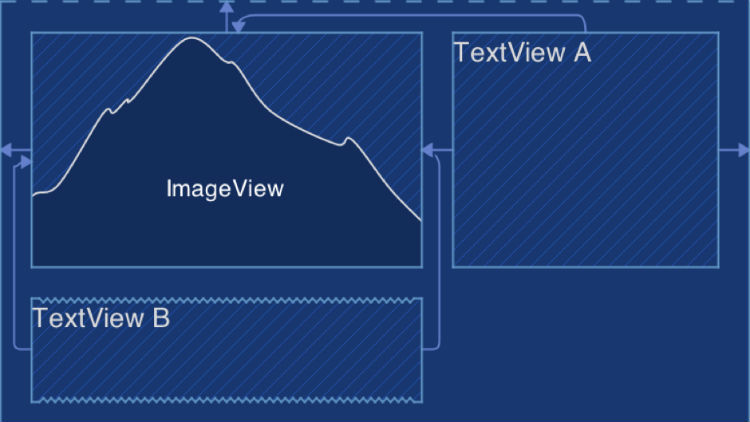
● Flexible interface construction: Android Studio 2.2 includes a flexible distribution system for dynamic user interfaces, which are designed by nesting elements. This is very similar to the prototype construction tools, in design phase, that are currently in the market.
4. APK analyzer
In Android Studio 2.2 and successive versions, inspecting the content of APK files to understand the exact distribution and size of each component is a simpler process.
The analyzer is also an interesting option for programmers because it allows them to compare two APK files that have evolved over time.
5. Development cache and Espresso Test Recorder (beta)
Android Studio 2.2 has some features in beta version that allow us to see how Google will keep improving the tool.
The first of these features consists in improving the cache for application development so as to reduce the speed with which programmers can develop their products by up to 200%. To do this, you only need to add the file android.enableBuildCache=truea su gradle.properties.
The second feature makes it possible to create user interface tests for an application without having to write test code. The tool creates a test scenario; logs the interactions that take place on a device; records these interactions; and automatically generates a user interface test for execution and application testing.
Banco Bilbao Vizcaya Argentaria, S.A. owner of this portal uses cookies and/or similar technologies of its own and third parties for the purposes of personalization, analytics, behavioral advertising or advertising related to your preferences based on a profile prepared from your browsing habits (e.g. pages visited). If you wish to obtain more detailed information, consult our Cookies Policy.
Cookie settings panel
These are the advanced settings for first-party and third-party cookies. Here you can change the parameters that will affect your browsing experience on this website.
Technical Cookies (required)
These cookies are used to give you secure access to areas with personal information and to identify you when you log in.
Name
Owner
Duration
Description
gobp.lang
BBVA
1 month
Language preference
aceptarCookies
BBVA
1 year
Configuration Accepted Cookies
_abck
BBVA
1 year
Helps protect against malicious website attacks
bm_sz
BBVA
4 hours
Helps protect against malicious website attacks
ADRUM_BTs
Salesforce Marketing Cloud
Session
Required for monitoring of the service, inherent to SFMC
ADRUM_BT1
Salesforce Marketing Cloud
Session
Required for monitoring of the service, inherent to SFMC
ADRUM_BTa
Salesforce Marketing Cloud
Session
Required for monitoring of the service, inherent to SFMC
ADRUM_BT
Salesforce Marketing Cloud
Session
Required for monitoring of the service, inherent to SFMC
xt_0d95e
Salesforce Marketing Cloud
Session
Remember user preferences (if any)
__s9744cdb192d044faa1bf201d29fafd1e
Salesforce Marketing Cloud
Session
Remember user preferences (if any)
wpml_browser_redirect_test
WPML
Session
Text translation in the portal
wp-wpml_current_language
WPML
24 hours
Text translation in the portal
Analytics Cookies
They are used to track the activity or number of visits anonymously. Thanks to them we can constantly improve your browsing experience
Your browsing experience is constantly improving.
With your selection, we cannot offer you a continuously improved browsing experience.
Name
Owner
Duration
Description
AMCV_***
Adobe Analytics
Session
Unique Visitor IDs used in Cloud Marketing solutions
AMCVS_***
Adobe Analytics
2 years
Unique Visitor IDs used in Cloud Marketing solutions
demdex (safari)
Adobe Analytics
180 days
Create and store unique and persistent identifiers
sessionID
Adobe Analytics
Session
Launch's internal cookie used to identify the user
gpv_URL
Adobe Analytics
Session
Adobe Analytics plugin: getPreviousValue Capture the value of a certain variable in the following page view, in this case the prop1
gpv_level1
Adobe Analytics
Session
Cookie used to store the DataLayer levl1 of the previous page.
gpv_pageIntent
Adobe Analytics
Session
Cookie used to store the pageIntent of the previous page.
gpv_pageName
Adobe Analytics
Session
Cookie used to store the pagename of the previous page.
aocs
Adobe Analytics
Session
Cookie that stores the first values collected at the beginning of a process.
TTC
Adobe Analytics
Session
Cookie used to store the time between the App Page Visit event and the App Completed event.
TTCL
Adobe Analytics
Session
Cookie used to store the time between the LogIn event and App Completed.
s_cc
Adobe Analytics
Session
Determine if cookies are active
s_hc
Adobe Analytics
Session
Cookie used by Adobe for analytical purposes
s_ht
Adobe Analytics
Session
Cookie used by Adobe for analytical purposes
s_nr
Adobe Analytics
2 years
Determine the number of user visits
s_ppv
Adobe Analytics
Permanent
Adobe Analytics plugin: getPercentPageViewed Determine what percentage of the page a user views
s_sq
Adobe Analytics
Session
ClickMap/ActivityMap features
s_tp
Adobe Analytics
Session
Cookie used by Adobe for analytical purposes
s_visit
Adobe Analytics
2 years
Cookie used by Adobe to know when a session has been started.
Advertising Cookies
They allow the advertising shown to you to be customized and relevant to you. Thanks to these cookies, you will not see ads that you are not interested in.
The advertising is customized to you and your preferences.
Your choice means you will not see customized ads, only generic ones.
Name
Owner
Duration
Description
OT2
VersaTag
90 days
VersaTag Cookie used to store a user id and the number of user visits.
u2
VersaTag
90 days
VersaTag Cookie where the user ID is stored
TargetingInfo 2
MediaMind
1 year
Cookie that serves to assign a unique random number that generates MediaMind.
Customization Cookies
These cookies are related to general features such as the browser you use.
Your experience and content have been customized.
With your selection, we cannot offer you a continuously improved browsing experience.
Name
Owner
Duration
Description
mbox
Adobe Target
9 days
Cookie used by Adobe Target to test user experience customization.
Looks like you’re browsing from MexicoSpainArgentinaPeruColombiaBelgiumChileUSAFranceHong KongItalyPortugalUnited KingdomTurkeyUruguayVenezuelaAlemania, so let’s show you the custom content for your
location. Change
Select a country
In order to access the private area and corresponding sandbox, select the country of the APIs you want to use.