New notifications for iOS 10, tvOS and watchOS developers
Apple has released changes to push notifications for some of its key products (iPhone, iPad, Apple Watch and Apple TV). These changes include rich content (images, GIFs, videos and sounds), actions and advantages with 3D Touch.
The latest iOS version contains some interesting alterations for the teams that conceptualize and develop products. Among its new features, iOS 10 includes push notifications with a different look and feel and clear advantages such as rich content and changes to the provider’s protocol. In the words of Apple itself, “push notifications are great for keeping users informed with timely and relevant content, whether your app is running in the background or inactive.” They are a very interesting resource.
In the case of iOS, the first major benefit is that these alterations do not only impact the iOS 10 operating system (smartphones and tablets), they also affect tvOS (Apple TV, the multimedia digital receptor that plays content from iTunes, YouTube, Vimeo, Netflix, etc. ) and watchOS 3 (the operating system of Apple’s smart watch, Apple Watch). Consequently, this means that the changes involve all of Apple’s products.
Firstly, we need to distinguish between the two types of push notifications included in the latest versions of Apple’s operating systems:
Remote push notifications: Usually sent over media apps, social networks (e.g. Twitter and Facebook) and instant messaging services (e.g. WhatsApp and Telegram). These notifications are sent from these applications to the Apple Push Notification (APNs) service. They are sent as follows:
Local notifications: With this type of notification, the application itself set ups the alert’s details locally and sends the information to the system; the system then sends the notification when the application is not on the foreground. As it happens with remote notifications, these notifications are compatible with iOS, tvOS and watchOS.
The main changes introduced by Apple in this service:
Notifications with rich content.
The changes made by Apple allow app developers to send users all sorts of content via push notifications: text (it was already common) but also images (in GIF animated format), videos and audio. These are called rich content notifications. The goal is to try to add some advantages that may increase the opening rates of alerts sent to mobile devices, mostly in sectors such as media.
Push notifications also include class UNMutableNotificationContent, which contains the data associated with push notifications. In this case, programmers can, for example, associate elements such as sound, with variable varUNNotificationSound. Naturally, this class must be associated with an object UNNotificactionRequest. To integrate an added element into the notification, developers must use variable var UNNotificationAttachment, with statement: var attachments: [UNNotificationAttachment] { get set }. This makes it possible to include images, GIFs and videos in push alerts in iOS 10.
2. Actions associated with push notifications.
Apple’s new push notifications can be associated with a series of actions for the user to make decisions about the alert in question. Obviously, these actions will be selected by the application’s product and development team. In short, this is an option that iOS and watchOS programmers can use to facilitate user customization. For example, users may reply to the message through an instant messaging application within the push notification on their phone.
Programmers can assign customized actions to each type of notification that is compatible with the application (defined using class UNNotificationCategory). The purpose is to have all necessary information for displaying the task as expected. This is done through an identifier, a unique string used to identify an action: When the user selects it, the system sends this string to the app through the object UNNotificationResponse and requests that the task be carried. The statement is:
3D Touch has been part of Apple’s releases since iPhone 6S and 6S Plus. This technology was a major development and, naturally, it has interesting effects from version 10 of Apple’s operating system onward. 3D Touch allows users to carry out actions that, in principle, are not visible by applying slightly more pressure on the device’s screen. To some extent, this is a feature for deploying quick access.
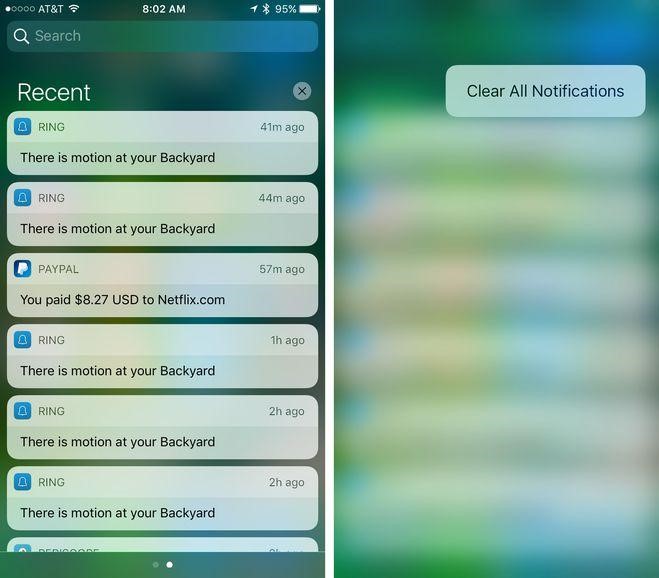
In the specific case of notifications, 3D Touch enables direct user interaction with alerts without having to load the application from the background or when the app is inactive. Users are able to reply to a message directly from WhatsApp, or to an email from Gmail. It is compatible with some of the key system applications: FaceTime, Calendar and Messages. It is also possible, for instance, to quickly delete all notifications from the device at the same time by repeatedly pressing the X icon (delete) at the top.
Banco Bilbao Vizcaya Argentaria, S.A. owner of this portal uses cookies and/or similar technologies of its own and third parties for the purposes of personalization, analytics, behavioral advertising or advertising related to your preferences based on a profile prepared from your browsing habits (e.g. pages visited). If you wish to obtain more detailed information, consult our Cookies Policy.
Cookie settings panel
These are the advanced settings for first-party and third-party cookies. Here you can change the parameters that will affect your browsing experience on this website.
Technical Cookies (required)
These cookies are used to give you secure access to areas with personal information and to identify you when you log in.
Name
Owner
Duration
Description
gobp.lang
BBVA
1 month
Language preference
aceptarCookies
BBVA
1 year
Configuration Accepted Cookies
_abck
BBVA
1 year
Helps protect against malicious website attacks
bm_sz
BBVA
4 hours
Helps protect against malicious website attacks
ADRUM_BTs
Salesforce Marketing Cloud
Session
Required for monitoring of the service, inherent to SFMC
ADRUM_BT1
Salesforce Marketing Cloud
Session
Required for monitoring of the service, inherent to SFMC
ADRUM_BTa
Salesforce Marketing Cloud
Session
Required for monitoring of the service, inherent to SFMC
ADRUM_BT
Salesforce Marketing Cloud
Session
Required for monitoring of the service, inherent to SFMC
xt_0d95e
Salesforce Marketing Cloud
Session
Remember user preferences (if any)
__s9744cdb192d044faa1bf201d29fafd1e
Salesforce Marketing Cloud
Session
Remember user preferences (if any)
wpml_browser_redirect_test
WPML
Session
Text translation in the portal
wp-wpml_current_language
WPML
24 hours
Text translation in the portal
Analytics Cookies
They are used to track the activity or number of visits anonymously. Thanks to them we can constantly improve your browsing experience
Your browsing experience is constantly improving.
With your selection, we cannot offer you a continuously improved browsing experience.
Name
Owner
Duration
Description
AMCV_***
Adobe Analytics
Session
Unique Visitor IDs used in Cloud Marketing solutions
AMCVS_***
Adobe Analytics
2 years
Unique Visitor IDs used in Cloud Marketing solutions
demdex (safari)
Adobe Analytics
180 days
Create and store unique and persistent identifiers
sessionID
Adobe Analytics
Session
Launch's internal cookie used to identify the user
gpv_URL
Adobe Analytics
Session
Adobe Analytics plugin: getPreviousValue Capture the value of a certain variable in the following page view, in this case the prop1
gpv_level1
Adobe Analytics
Session
Cookie used to store the DataLayer levl1 of the previous page.
gpv_pageIntent
Adobe Analytics
Session
Cookie used to store the pageIntent of the previous page.
gpv_pageName
Adobe Analytics
Session
Cookie used to store the pagename of the previous page.
aocs
Adobe Analytics
Session
Cookie that stores the first values collected at the beginning of a process.
TTC
Adobe Analytics
Session
Cookie used to store the time between the App Page Visit event and the App Completed event.
TTCL
Adobe Analytics
Session
Cookie used to store the time between the LogIn event and App Completed.
s_cc
Adobe Analytics
Session
Determine if cookies are active
s_hc
Adobe Analytics
Session
Cookie used by Adobe for analytical purposes
s_ht
Adobe Analytics
Session
Cookie used by Adobe for analytical purposes
s_nr
Adobe Analytics
2 years
Determine the number of user visits
s_ppv
Adobe Analytics
Permanent
Adobe Analytics plugin: getPercentPageViewed Determine what percentage of the page a user views
s_sq
Adobe Analytics
Session
ClickMap/ActivityMap features
s_tp
Adobe Analytics
Session
Cookie used by Adobe for analytical purposes
s_visit
Adobe Analytics
2 years
Cookie used by Adobe to know when a session has been started.
Advertising Cookies
They allow the advertising shown to you to be customized and relevant to you. Thanks to these cookies, you will not see ads that you are not interested in.
The advertising is customized to you and your preferences.
Your choice means you will not see customized ads, only generic ones.
Name
Owner
Duration
Description
OT2
VersaTag
90 days
VersaTag Cookie used to store a user id and the number of user visits.
u2
VersaTag
90 days
VersaTag Cookie where the user ID is stored
TargetingInfo 2
MediaMind
1 year
Cookie that serves to assign a unique random number that generates MediaMind.
Customization Cookies
These cookies are related to general features such as the browser you use.
Your experience and content have been customized.
With your selection, we cannot offer you a continuously improved browsing experience.
Name
Owner
Duration
Description
mbox
Adobe Target
9 days
Cookie used by Adobe Target to test user experience customization.
Looks like you’re browsing from MexicoSpainArgentinaPeruColombiaBelgiumChileUSAFranceHong KongItalyPortugalUnited KingdomTurkeyUruguayVenezuelaAlemania, so let’s show you the custom content for your
location. Change
Select a country
In order to access the private area and corresponding sandbox, select the country of the APIs you want to use.