Progressive Web Apps, the mix between traditional websites and native apps
The great battle, not only within the media but other sectors such as retail, banking or technology, is on mobile devices. To be able to understand how to adapt the consumer experience of products to the needs of users on smartphones, for now the device that has the greatest degree of intimacy with end customers. One of the latest on the market is Progressive Web Apps, a Google-sponsored alternative that is a mix between the mobile web consumed by the browser and native apps installed on the phone.
In a single sentence, the ultimate goal of the PWA is to get a native app user experience on the web, today it is mainly consumed by the mobile device. For product teams, the final idea is to develop once and deploy on all possible devices, from both a hardware and software standpoint. What is ultimately sought is that it has a number of common elements that closely resemble the great features that a native app usually has and keep some great advantages of traditional websites:
● Progressive apps are designed to have access to all users: most browsers support these types of web apps.
● Very fast loading and interaction.
● Perfectly adapted to all screens: the Google PWA have the capacity to adapt to desktop, mobile, tablet, Smart TV … any device. The principle is developed once, it accesses any device.
● Consumption without WiFi or 3G/4G data: you don’t need a high quality connection to browse them. Not even connection.
● Navigation and own interactions of a native app: a progressive app must be designed for the user’s touch.
● Quick access on a mobile or tablet from the main view. Shortcut icon on the phone without having to download in an app store. This is possible thanks to the incorporation of metadata, not just downloading this shortcut, but launching splash screens.
● Visible to search engines.
● Ability to send push notifications like any native app.
● HTTPS secure protocol applications: there is much talk of the future of HTTPS; this avoids content from being manipulated by third parties.
● Guaranteed recirculation through the typical hyperlink on the web.
Design and User Experience in Progressive Web Apps
The treatment that product teams must give to Progressive Web Apps is very different from developing native apps. Although there are common elements, some factors such as design and user experience incorporates different elements in apps and PWA.
● Animations: useful elements to increase the user engagement element with a web application, but also pose a risk if misused. They must not cause adverse effects on the app’s performance and should be chosen carefully to surprise or generate specific actions and great value for users. The most common is to use animations to support interactions. Animations in Progressive Web Apps are created with CSS or JavaScript, two of the languages used in traditional websites together with well-known HTML. Animations can be used to move between different screens.
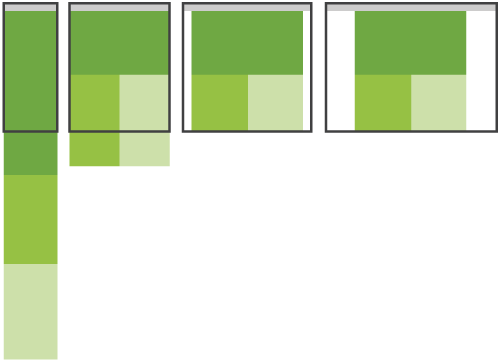
Responsive layouts: in the end of the wide variety of devices (with screens in different sizes: desktop, mobile, tablet, phablets and smart TV) have led to the need to implement designs that are able to adapt to different screens. That is what is known as responsive design and it is what Progressive Web Apps are gunning for. In the end everything is based on traditional patterns of this type of adaptive design: Mostly Fluid, Column Drop, Layout Shifter, Tiny Tweaks and Off Canvas. In each, the different columns fall down and are positioned vertically or horizontally as the screen becomes smaller, except in theOff Canvas pattern, that leverages the invisible part to hide and remove columns.
● Image, video and audio are three of the data elements that often suffer to a great extent in responsive designs if you are not careful with images and videos. In the case of images, the use of the img element is the best possible solution, especially if relative sizes are used, even marking specific sizes and densities for each type of display, and also indicating the size of those images based on the cuts that will be implemented in the design as the screen gets smaller.
SEO, social media and making money in Progressive Web Apps
The positioning conditions vary greatly between a native app and a Progressive Web App. The former compete for a position in app stores. Optimization of all factors that enable better positioning in these app stores are known by ASO (App Store Optimization). Progressive Web Apps play in another league: in the end they compete on the same stage as other traditional websites, with elements which condition SEO optimization or searches.
As in the traditional web, adding a few lines of HTML to develop a PWA will make it possible to control messages and pictures that are disseminated with our content when users share it on social networks. Google also adds the recommendation to use the protocol schema and microdata to enrich the content that is shared on its Google + social network. This is a practical example of code inserted into each content page:
Banco Bilbao Vizcaya Argentaria, S.A. owner of this portal uses cookies and/or similar technologies of its own and third parties for the purposes of personalization, analytics, behavioral advertising or advertising related to your preferences based on a profile prepared from your browsing habits (e.g. pages visited). If you wish to obtain more detailed information, consult our Cookies Policy.
Cookie settings panel
These are the advanced settings for first-party and third-party cookies. Here you can change the parameters that will affect your browsing experience on this website.
Technical Cookies (required)
These cookies are used to give you secure access to areas with personal information and to identify you when you log in.
Name
Owner
Duration
Description
gobp.lang
BBVA
1 month
Language preference
aceptarCookies
BBVA
1 year
Configuration Accepted Cookies
_abck
BBVA
1 year
Helps protect against malicious website attacks
bm_sz
BBVA
4 hours
Helps protect against malicious website attacks
ADRUM_BTs
Salesforce Marketing Cloud
Session
Required for monitoring of the service, inherent to SFMC
ADRUM_BT1
Salesforce Marketing Cloud
Session
Required for monitoring of the service, inherent to SFMC
ADRUM_BTa
Salesforce Marketing Cloud
Session
Required for monitoring of the service, inherent to SFMC
ADRUM_BT
Salesforce Marketing Cloud
Session
Required for monitoring of the service, inherent to SFMC
xt_0d95e
Salesforce Marketing Cloud
Session
Remember user preferences (if any)
__s9744cdb192d044faa1bf201d29fafd1e
Salesforce Marketing Cloud
Session
Remember user preferences (if any)
wpml_browser_redirect_test
WPML
Session
Text translation in the portal
wp-wpml_current_language
WPML
24 hours
Text translation in the portal
Analytics Cookies
They are used to track the activity or number of visits anonymously. Thanks to them we can constantly improve your browsing experience
Your browsing experience is constantly improving.
With your selection, we cannot offer you a continuously improved browsing experience.
Name
Owner
Duration
Description
AMCV_***
Adobe Analytics
Session
Unique Visitor IDs used in Cloud Marketing solutions
AMCVS_***
Adobe Analytics
2 years
Unique Visitor IDs used in Cloud Marketing solutions
demdex (safari)
Adobe Analytics
180 days
Create and store unique and persistent identifiers
sessionID
Adobe Analytics
Session
Launch's internal cookie used to identify the user
gpv_URL
Adobe Analytics
Session
Adobe Analytics plugin: getPreviousValue Capture the value of a certain variable in the following page view, in this case the prop1
gpv_level1
Adobe Analytics
Session
Cookie used to store the DataLayer levl1 of the previous page.
gpv_pageIntent
Adobe Analytics
Session
Cookie used to store the pageIntent of the previous page.
gpv_pageName
Adobe Analytics
Session
Cookie used to store the pagename of the previous page.
aocs
Adobe Analytics
Session
Cookie that stores the first values collected at the beginning of a process.
TTC
Adobe Analytics
Session
Cookie used to store the time between the App Page Visit event and the App Completed event.
TTCL
Adobe Analytics
Session
Cookie used to store the time between the LogIn event and App Completed.
s_cc
Adobe Analytics
Session
Determine if cookies are active
s_hc
Adobe Analytics
Session
Cookie used by Adobe for analytical purposes
s_ht
Adobe Analytics
Session
Cookie used by Adobe for analytical purposes
s_nr
Adobe Analytics
2 years
Determine the number of user visits
s_ppv
Adobe Analytics
Permanent
Adobe Analytics plugin: getPercentPageViewed Determine what percentage of the page a user views
s_sq
Adobe Analytics
Session
ClickMap/ActivityMap features
s_tp
Adobe Analytics
Session
Cookie used by Adobe for analytical purposes
s_visit
Adobe Analytics
2 years
Cookie used by Adobe to know when a session has been started.
Advertising Cookies
They allow the advertising shown to you to be customized and relevant to you. Thanks to these cookies, you will not see ads that you are not interested in.
The advertising is customized to you and your preferences.
Your choice means you will not see customized ads, only generic ones.
Name
Owner
Duration
Description
OT2
VersaTag
90 days
VersaTag Cookie used to store a user id and the number of user visits.
u2
VersaTag
90 days
VersaTag Cookie where the user ID is stored
TargetingInfo 2
MediaMind
1 year
Cookie that serves to assign a unique random number that generates MediaMind.
Customization Cookies
These cookies are related to general features such as the browser you use.
Your experience and content have been customized.
With your selection, we cannot offer you a continuously improved browsing experience.
Name
Owner
Duration
Description
mbox
Adobe Target
9 days
Cookie used by Adobe Target to test user experience customization.
Looks like you’re browsing from MexicoSpainArgentinaPeruColombiaBelgiumChileUSAFranceHong KongItalyPortugalUnited KingdomTurkeyUruguayVenezuelaAlemania, so let’s show you the custom content for your
location. Change
Select a country
In order to access the private area and corresponding sandbox, select the country of the APIs you want to use.