ReactJS, the front-end JavaScript library developed by Facebook
This is far from the first time that we at BBVAOpen4U have discussed JavaScript as a programming language that is ushering in sweeping change. The last two years have seen a colossal boom in the use of this syntax, with countless front-end libraries emerging for digital projects, specifically for application development. One great example of this is provided by ReactJS, a JavaScript library used to design single page applications (SPAs).
One advantage that ReactJS has over other libraries is that it is designed by one of the world’s most important firms. No introduction is required. ReactJS is a JS library developed by Facebook engineers to help developers design interfaces that meet top user experience standards. At the moment the library is in version 0.10.7 and has an open-source license.
Some key features of ReactJS:
● This is a JavaScript library, not a development framework in JavaScript. Therefore ReactJS does not compete in the same market as other solutions such as AngularJS, EmberJS or BackboneJS, which we have discussed here on more than one occasion. This is a tool for interfaces similar to Knockout.js.
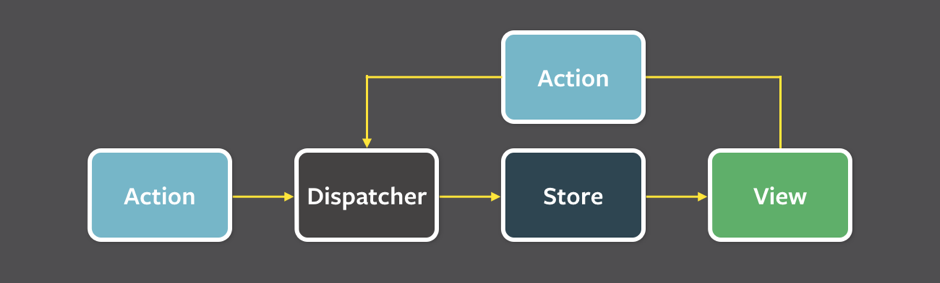
● ReactJS controls only the application view using the model-view-controller concept. Facebook engineers recommend that ReactJS be used together with Flux, the architecture harnessed by the social network to create client-side web applications. This means a shift from a MVC model to a unidirectional data flow. The idea is quite simple: application data flows in a single direction.
● ReactJS is usually combined with other library types or JavaScript development frameworks, such as those mentioned.
● Partial updating of DOM with each view change. With each alteration a virtual DOM is modified, which allows the real DOM to change only the aspects where there have been alterations. This makes for better memory use and performance than provided by other frameworks.
● We have already written how the use of components has emerged as an intriguing trend in application development. The main advantage is that these components can then be reused in subsequent developments. ReactJS is a perfect library for this new approach.
● ReactJS offers an alternative called JSX, an extension of the JavaScript syntax that has a similar appearance to the XML markup language. This is a statically typed object-oriented language that is designed to be run in all modern browsers. The main advantage of this programming language is that it is concise and simple when defining tree structures via attributes. Furthermore, code compiling is fast both for iOS and Android devices.
● ReactJS works with the new ECMAScript v6 standard for JavaScript.
● The learning curve is short for developers in JavaScript.
More about Flux as an architecture for ReactJS
Applications developed with Flux have three components that are based on the actions produced in applications as a result of user browsing: item selection, interaction with buttons or menus… Each of these browser movements generates an event in JavaScript. What do each of the app elements do with Flux as a result of said events?
● Dispatcher. This manages all events generated by user browsing and action creation. These actions may trigger reactions, or the opposite.
● Store. These store the necessary data and then change the view displayed to the user in the app. They connect the Dispatcher with the views.
● View. This is the visual result of the events and data modifications.
How to start working with ReactJS
To work with a library such as ReactJS you need three elements installed on your machine: Grunt, a JavaScript library for configuring automatic tasks that saves time and money in app development; Node.js, a server layer runtime environment; and NPM (Node Package Manager), the module installation system used with Node.js.
● Browserify: a popular package in NPM. This tool allows developers to manage client-side dependencies. It supports module installation and configuration via a bundle.
● Babel: a code-to-code compiler for JavaScript. This allows transformation of ECMAScript 6, the latest version of the ECMAScript language, into ECMAScript 5, which unlike ES6 is supported by browsers. This is the only way to harness the benefits of ES6 without running into problems. Babel is installed via NPM using this command:
<div id=”root”>
<p>Aquí cargará ReactJS su propio componente</p>
<p>Si ves esto, es que algo no ha salido bien :(</p>
</div>
<!– jQuery (necessary for Bootstrap’s JavaScript plugins) –>
<script src=”https://ajax.googleapis.com/ajax/libs/jquery/1.11.2/jquery.min.js“></script>
<!– Include all compiled plugins (below), or include individual files as needed –>
<script src=”//maxcdn.bootstrapcdn.com/bootstrap/3.3.2/js/bootstrap.min.js”></script>
<!– Este fichero contiene ReactJS y la definición de nuestro componente –>
<script src=”js/bundle.js”></script>
Banco Bilbao Vizcaya Argentaria, S.A. owner of this portal uses cookies and/or similar technologies of its own and third parties for the purposes of personalization, analytics, behavioral advertising or advertising related to your preferences based on a profile prepared from your browsing habits (e.g. pages visited). If you wish to obtain more detailed information, consult our Cookies Policy.
Cookie settings panel
These are the advanced settings for first-party and third-party cookies. Here you can change the parameters that will affect your browsing experience on this website.
Technical Cookies (required)
These cookies are used to give you secure access to areas with personal information and to identify you when you log in.
Name
Owner
Duration
Description
gobp.lang
BBVA
1 month
Language preference
aceptarCookies
BBVA
1 year
Configuration Accepted Cookies
_abck
BBVA
1 year
Helps protect against malicious website attacks
bm_sz
BBVA
4 hours
Helps protect against malicious website attacks
ADRUM_BTs
Salesforce Marketing Cloud
Session
Required for monitoring of the service, inherent to SFMC
ADRUM_BT1
Salesforce Marketing Cloud
Session
Required for monitoring of the service, inherent to SFMC
ADRUM_BTa
Salesforce Marketing Cloud
Session
Required for monitoring of the service, inherent to SFMC
ADRUM_BT
Salesforce Marketing Cloud
Session
Required for monitoring of the service, inherent to SFMC
xt_0d95e
Salesforce Marketing Cloud
Session
Remember user preferences (if any)
__s9744cdb192d044faa1bf201d29fafd1e
Salesforce Marketing Cloud
Session
Remember user preferences (if any)
wpml_browser_redirect_test
WPML
Session
Text translation in the portal
wp-wpml_current_language
WPML
24 hours
Text translation in the portal
Analytics Cookies
They are used to track the activity or number of visits anonymously. Thanks to them we can constantly improve your browsing experience
Your browsing experience is constantly improving.
With your selection, we cannot offer you a continuously improved browsing experience.
Name
Owner
Duration
Description
AMCV_***
Adobe Analytics
Session
Unique Visitor IDs used in Cloud Marketing solutions
AMCVS_***
Adobe Analytics
2 years
Unique Visitor IDs used in Cloud Marketing solutions
demdex (safari)
Adobe Analytics
180 days
Create and store unique and persistent identifiers
sessionID
Adobe Analytics
Session
Launch's internal cookie used to identify the user
gpv_URL
Adobe Analytics
Session
Adobe Analytics plugin: getPreviousValue Capture the value of a certain variable in the following page view, in this case the prop1
gpv_level1
Adobe Analytics
Session
Cookie used to store the DataLayer levl1 of the previous page.
gpv_pageIntent
Adobe Analytics
Session
Cookie used to store the pageIntent of the previous page.
gpv_pageName
Adobe Analytics
Session
Cookie used to store the pagename of the previous page.
aocs
Adobe Analytics
Session
Cookie that stores the first values collected at the beginning of a process.
TTC
Adobe Analytics
Session
Cookie used to store the time between the App Page Visit event and the App Completed event.
TTCL
Adobe Analytics
Session
Cookie used to store the time between the LogIn event and App Completed.
s_cc
Adobe Analytics
Session
Determine if cookies are active
s_hc
Adobe Analytics
Session
Cookie used by Adobe for analytical purposes
s_ht
Adobe Analytics
Session
Cookie used by Adobe for analytical purposes
s_nr
Adobe Analytics
2 years
Determine the number of user visits
s_ppv
Adobe Analytics
Permanent
Adobe Analytics plugin: getPercentPageViewed Determine what percentage of the page a user views
s_sq
Adobe Analytics
Session
ClickMap/ActivityMap features
s_tp
Adobe Analytics
Session
Cookie used by Adobe for analytical purposes
s_visit
Adobe Analytics
2 years
Cookie used by Adobe to know when a session has been started.
Advertising Cookies
They allow the advertising shown to you to be customized and relevant to you. Thanks to these cookies, you will not see ads that you are not interested in.
The advertising is customized to you and your preferences.
Your choice means you will not see customized ads, only generic ones.
Name
Owner
Duration
Description
OT2
VersaTag
90 days
VersaTag Cookie used to store a user id and the number of user visits.
u2
VersaTag
90 days
VersaTag Cookie where the user ID is stored
TargetingInfo 2
MediaMind
1 year
Cookie that serves to assign a unique random number that generates MediaMind.
Customization Cookies
These cookies are related to general features such as the browser you use.
Your experience and content have been customized.
With your selection, we cannot offer you a continuously improved browsing experience.
Name
Owner
Duration
Description
mbox
Adobe Target
9 days
Cookie used by Adobe Target to test user experience customization.
Looks like you’re browsing from MexicoSpainArgentinaPeruColombiaBelgiumChileUSAFranceHong KongItalyPortugalUnited KingdomTurkeyUruguayVenezuelaAlemania, so let’s show you the custom content for your
location. Change
Select a country
In order to access the private area and corresponding sandbox, select the country of the APIs you want to use.