Accelerated Mobile Pages and Progressive Web Apps, the future of the Web designed by Google
Google’s two latest projects refer to the websites of the future and are mostly focused on content loading speed and user experience. These two issues have become an obsession for Google, not only in terms of the media but also as referents to the whole World Wide Web. Accelerated Mobile Pages (AMP) and Progressive Web Apps (PWA) seek to offer a fast and satisfactory reading experience where friction and frustration are reduced to the minimum and user engagement skyrockets.
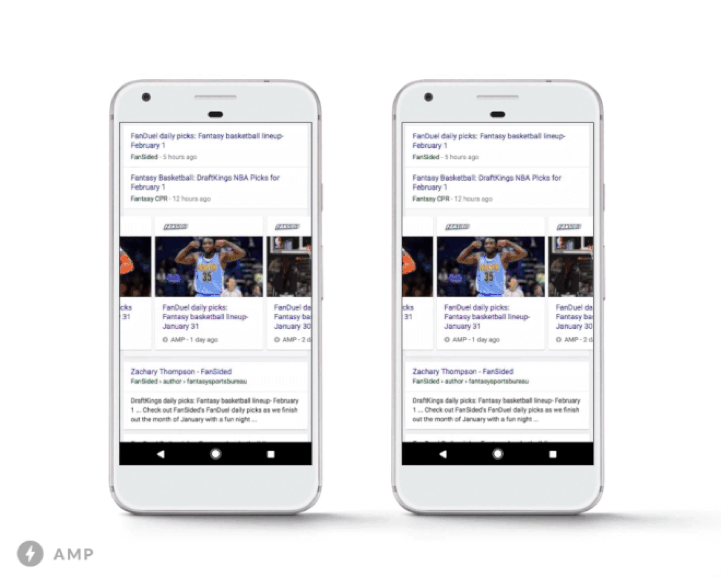
AMP is a new way of developing static content web pages so that, when they are rendered by a browser, the loading speed is as fast as possible.
An AMP web page consists of three simple elements:
1. HTML AMP, a traditional HTML document with some restrictions. In the end, these restrictions allow the web page to load at full speed (the enriched content is always handled through extensions).
2. An AMP-specific JavaScript library, responsible for quick HMTL rendering.
3. The AMP cache, which makes it possible for the browser to render an AMP cache (this typical web page element speeds up content loading even more).
PWA aims to add to the quick-loading web page some of the features that ensure the power of native mobile applications, such as push notifications and high availability using a desktop icon, besides always rendering under a secure HTTPs protocol domain.
Google’s idea is to facilitate the load of content always instantaneously, even when the connectivity is not good; ensure quick response to the user’s interactions with smooth animations; and guarantee greater user engagement through an immersive ecosystem.
First steps in AMP’s roadmap for 2017
At the start of this year, Google has made some interesting changes to the AMP roadmap. Google has improved some of the project’s major elements, e.g. it has polished some of the interactive formats such as the galleries, carousels or modules with small images (for example, the forms). Additionally, it has improved the optimization of advertising loading in AMP web pages. And lastly, it has improved analytics, particularly for pages with steppers and forms such as e-commerce (improves data gathering when processes are stringed within a website).
Interactive forms: the amp-bind resource allows developers to create interactive formats and modules in addition to the default AMP components, primarily AMP-carousel, AMP-img, AMP-selector and AMP-video. Some of these default elements have also been improved as a result of the requirements of common web projects such as e-commerce, where forms are used extensively. There is also AMP Start, a set of code fragments that act as a fast start-up package that developers can use to create and customize the AMP code on their web pages.
Advertising: this was one of the major gaps in AMP, which Google has decided to correct during the first quarter of 2017. Moving forward, the rendered code of advertising in AMP will be faster, with an underlying warning background to reduce loading times as much as possible and avoid blank spaces that do not provide any information to the user. Also, Google has improved some fixed advertising formats such as the amp-sticky-ad, which is fixed to the bottom of the interface.
Analytics: Google will soon make it possible to include customized variables as user IDs within the pages to obtain data from stringed processes in the same page, such as a shopping cart or a form, and generate actual metric-related value. This is a major factor in ensuring that AMP expands to vital digital economy sectors and, as such, becomes a commonly used solution. ● Analytics: Google will soon make it possible to include customized variables as user IDs within the pages to obtain data from stringed processes in the same page, such as a shopping cart or a form, and generate actual metric-related value. This is a major factor in ensuring that AMP expands to vital digital economy sectors and, as such, becomes a commonly used solution.
2017 changes to PWA
One of the latest changes to PWA focuses on improving content loading times, mainly linked to the service worker, a JavaScript file that runs in the background and ensures that PWA pages have the same offline functionality as native applications, for instance. Service workers are located between the customer and the network and act as a proxy to cache content.
To a large extent, the loading speed of this type of page relies on these service workers since they include a shell, a series of HTML, CSS and JavaScript files that are immediately loaded to the interface.
Until now, the service worker returned the result of a request to the browser when requested but this always happened after launching. Under normal conditions, a service worker takes 50 ms on average to launch and serve content the browser is able to render. In mobile devices, this may go up to 250 ms in the fastest models and 500 ms in the slowest models. Even though the service worker stays active in the background between browser requests, sometimes there are requests for a different website or from a different tab.
To correct this situation, Google has changed its approach: instead of beginning to load the request to send it to the browser after the service worker launches, these two actions take place in parallel: the request is the object of a sort of pre-load without having to wait for the service worker. The request could never be served before the service worker launches but this parallel action reduces the times.
Banco Bilbao Vizcaya Argentaria, S.A. owner of this portal uses cookies and/or similar technologies of its own and third parties for the purposes of personalization, analytics, behavioral advertising or advertising related to your preferences based on a profile prepared from your browsing habits (e.g. pages visited). If you wish to obtain more detailed information, consult our Cookies Policy.
Cookie settings panel
These are the advanced settings for first-party and third-party cookies. Here you can change the parameters that will affect your browsing experience on this website.
Technical Cookies (required)
These cookies are used to give you secure access to areas with personal information and to identify you when you log in.
Name
Owner
Duration
Description
gobp.lang
BBVA
1 month
Language preference
aceptarCookies
BBVA
1 year
Configuration Accepted Cookies
_abck
BBVA
1 year
Helps protect against malicious website attacks
bm_sz
BBVA
4 hours
Helps protect against malicious website attacks
ADRUM_BTs
Salesforce Marketing Cloud
Session
Required for monitoring of the service, inherent to SFMC
ADRUM_BT1
Salesforce Marketing Cloud
Session
Required for monitoring of the service, inherent to SFMC
ADRUM_BTa
Salesforce Marketing Cloud
Session
Required for monitoring of the service, inherent to SFMC
ADRUM_BT
Salesforce Marketing Cloud
Session
Required for monitoring of the service, inherent to SFMC
xt_0d95e
Salesforce Marketing Cloud
Session
Remember user preferences (if any)
__s9744cdb192d044faa1bf201d29fafd1e
Salesforce Marketing Cloud
Session
Remember user preferences (if any)
wpml_browser_redirect_test
WPML
Session
Text translation in the portal
wp-wpml_current_language
WPML
24 hours
Text translation in the portal
Analytics Cookies
They are used to track the activity or number of visits anonymously. Thanks to them we can constantly improve your browsing experience
Your browsing experience is constantly improving.
With your selection, we cannot offer you a continuously improved browsing experience.
Name
Owner
Duration
Description
AMCV_***
Adobe Analytics
Session
Unique Visitor IDs used in Cloud Marketing solutions
AMCVS_***
Adobe Analytics
2 years
Unique Visitor IDs used in Cloud Marketing solutions
demdex (safari)
Adobe Analytics
180 days
Create and store unique and persistent identifiers
sessionID
Adobe Analytics
Session
Launch's internal cookie used to identify the user
gpv_URL
Adobe Analytics
Session
Adobe Analytics plugin: getPreviousValue Capture the value of a certain variable in the following page view, in this case the prop1
gpv_level1
Adobe Analytics
Session
Cookie used to store the DataLayer levl1 of the previous page.
gpv_pageIntent
Adobe Analytics
Session
Cookie used to store the pageIntent of the previous page.
gpv_pageName
Adobe Analytics
Session
Cookie used to store the pagename of the previous page.
aocs
Adobe Analytics
Session
Cookie that stores the first values collected at the beginning of a process.
TTC
Adobe Analytics
Session
Cookie used to store the time between the App Page Visit event and the App Completed event.
TTCL
Adobe Analytics
Session
Cookie used to store the time between the LogIn event and App Completed.
s_cc
Adobe Analytics
Session
Determine if cookies are active
s_hc
Adobe Analytics
Session
Cookie used by Adobe for analytical purposes
s_ht
Adobe Analytics
Session
Cookie used by Adobe for analytical purposes
s_nr
Adobe Analytics
2 years
Determine the number of user visits
s_ppv
Adobe Analytics
Permanent
Adobe Analytics plugin: getPercentPageViewed Determine what percentage of the page a user views
s_sq
Adobe Analytics
Session
ClickMap/ActivityMap features
s_tp
Adobe Analytics
Session
Cookie used by Adobe for analytical purposes
s_visit
Adobe Analytics
2 years
Cookie used by Adobe to know when a session has been started.
Advertising Cookies
They allow the advertising shown to you to be customized and relevant to you. Thanks to these cookies, you will not see ads that you are not interested in.
The advertising is customized to you and your preferences.
Your choice means you will not see customized ads, only generic ones.
Name
Owner
Duration
Description
OT2
VersaTag
90 days
VersaTag Cookie used to store a user id and the number of user visits.
u2
VersaTag
90 days
VersaTag Cookie where the user ID is stored
TargetingInfo 2
MediaMind
1 year
Cookie that serves to assign a unique random number that generates MediaMind.
Customization Cookies
These cookies are related to general features such as the browser you use.
Your experience and content have been customized.
With your selection, we cannot offer you a continuously improved browsing experience.
Name
Owner
Duration
Description
mbox
Adobe Target
9 days
Cookie used by Adobe Target to test user experience customization.
Looks like you’re browsing from MexicoSpainArgentinaPeruColombiaBelgiumChileUSAFranceHong KongItalyPortugalUnited KingdomTurkeyUruguayVenezuelaAlemania, so let’s show you the custom content for your
location. Change
Select a country
In order to access the private area and corresponding sandbox, select the country of the APIs you want to use.