Dash, Zeal and DevDocs: a way to organize your API repository
The world of software development has jumped into a Ferrari on a German highway. There is an increasing number of programming languages, development frameworks, server-side interpreters, databases and APIs which you need to handle to be able to launch competitive projects. Following from this major boom in options, new management and productivity tools have been created. The organizers of application programming interfaces are a perfect example of this.
The market currently offers several organizers for APIs, syntax and framework technical documentation and all kinds of book shops or libraries. The main organizers are Dash, Zeal and DevDocs. They are possibly the most commonly used solutions by the developer community. And this popularity helps to evolve the tool quickly and efficiently.
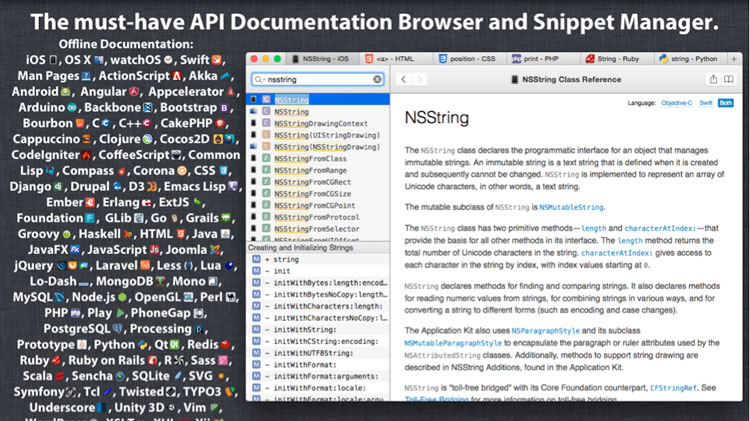
Dash: access to over 150 APIs
Dash is a tool for iOS and OSX which developers can use to browse technical documentation for more than 150 APIs. This organizer provides documentation offline. Users choose what they wish to download and Dash does it for them. Developers can also create their own technical information documents or request third-party documents.
Dash can also be integrated into third-party package managers so as to request and download any special and necessary documentation for a project. This includes the packages for the following: Ruby (Ruby Gems), Scala, Java, C, C++, C#, Objective-C, Python, JavaScript, HTML, Dart, Go and PHP. Additionally, you can download documentation from Stack Overflow, the page for developers. If you create docsets, you can share them with other users through a personalized URL.
In addition to searching for and downloading technical documents, Dash allows you to manage code fragments. This feature offers advantages that are very useful for developers:
● Storage and reuse of code fragments.
● Labelling of fragments for their classification and sorting.
● Syntax highlighting.
In June 2015, Dash 3 (version 3) was launched for the Mac OSX operating system; this is the latest and biggest update to date. Dash 3 incorporates some fundamental changes and additions at the request of the users:
● Less disk space used thanks to a new archiving system for technical documentation; documents are only unarchived when they are going to be used. Dash’s creators estimate that ten times less space is now used.
● Automatic tab restoration: the tool resumes the work session where you left it off.
● Configuration synchronization through the Mac, including installed technical documentation, search profiles and favorites.
● Opening local or online pages.
● Open-source, configurable annotations server: developers can add annotations with comments and examples and configure them as private only or completely public.
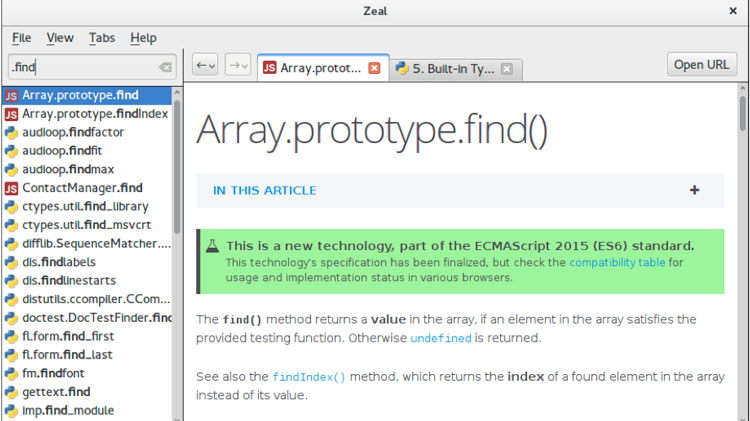
Zeal: Dash for Linux and Windows
Inspired by Dash, this is an offline browser of technical documentation for Linux and Windows operating systems. Zeal capitalizes on the market outside the Apple environment. Zeal makes it possible for development teams to always be able to access documents about their own as well as third-party APIs without having to be online, while benefitting from the integration of text editors such as VIM, Sublime Text, Emacs and KTextEditor or integrated development environments (IDEs) such as IntelliJ IDEA by using plugins:
● Plugin for integrating Sublime Text. Packages for the integration of editors or IDEs can be installed using package control (Git, the well-known version control tool, through the command git clone; alternatively, you can do it manually (download the Zeal package from its website on GitHub, unzip the file and copy the folder to the Sublime Text directory).
In a very similar way to Dash, it supports all types of documents: programming languages such as JavaScript, Java, Ruby, Python, C, C++, C#, PHP, Dart, Go, .NET and HTML. And solutions such as AngularJS, BackBoneJS, EmberJS, KnockoutJS, Bootstrap, CakePHP, Laravel, MongoDB, Ruby on Rails, symfony, Drupal, WordPress, Xaramin and jQuery. In total,
Zeal is pretty easy to install. If your operating system is Ubuntu, you only need to run these three codes:
DevDocs, an offline browser with extension for Chrome
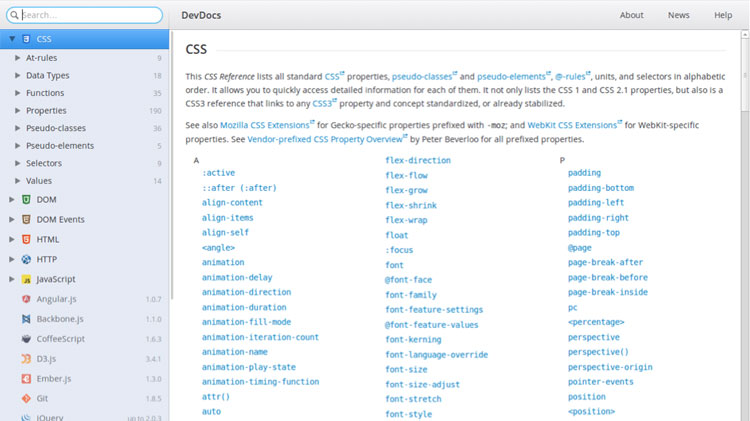
DevDocs, is another option for browsing technical documentation about different programming languages, software development tools and APIs. It was created by Thibaut Courouble, a developer for Shopify (online business creator) and CSSFlow (one of the most interesting pages with free widgets in HMTL5, CSS3 and Sass for front-end development of user interfaces).
These are some of its defining characteristics:
● Offline API browser: you don’t need to be connected to the internet.
● It has an extension to connect to Chrome.
● Free and open source.
● Integration plugins for editors such as Sublime Text, Atom and Brackets.
Banco Bilbao Vizcaya Argentaria, S.A. owner of this portal uses cookies and/or similar technologies of its own and third parties for the purposes of personalization, analytics, behavioral advertising or advertising related to your preferences based on a profile prepared from your browsing habits (e.g. pages visited). If you wish to obtain more detailed information, consult our Cookies Policy.
Cookie settings panel
These are the advanced settings for first-party and third-party cookies. Here you can change the parameters that will affect your browsing experience on this website.
Technical Cookies (required)
These cookies are used to give you secure access to areas with personal information and to identify you when you log in.
Name
Owner
Duration
Description
gobp.lang
BBVA
1 month
Language preference
aceptarCookies
BBVA
1 year
Configuration Accepted Cookies
_abck
BBVA
1 year
Helps protect against malicious website attacks
bm_sz
BBVA
4 hours
Helps protect against malicious website attacks
ADRUM_BTs
Salesforce Marketing Cloud
Session
Required for monitoring of the service, inherent to SFMC
ADRUM_BT1
Salesforce Marketing Cloud
Session
Required for monitoring of the service, inherent to SFMC
ADRUM_BTa
Salesforce Marketing Cloud
Session
Required for monitoring of the service, inherent to SFMC
ADRUM_BT
Salesforce Marketing Cloud
Session
Required for monitoring of the service, inherent to SFMC
xt_0d95e
Salesforce Marketing Cloud
Session
Remember user preferences (if any)
__s9744cdb192d044faa1bf201d29fafd1e
Salesforce Marketing Cloud
Session
Remember user preferences (if any)
wpml_browser_redirect_test
WPML
Session
Text translation in the portal
wp-wpml_current_language
WPML
24 hours
Text translation in the portal
Analytics Cookies
They are used to track the activity or number of visits anonymously. Thanks to them we can constantly improve your browsing experience
Your browsing experience is constantly improving.
With your selection, we cannot offer you a continuously improved browsing experience.
Name
Owner
Duration
Description
AMCV_***
Adobe Analytics
Session
Unique Visitor IDs used in Cloud Marketing solutions
AMCVS_***
Adobe Analytics
2 years
Unique Visitor IDs used in Cloud Marketing solutions
demdex (safari)
Adobe Analytics
180 days
Create and store unique and persistent identifiers
sessionID
Adobe Analytics
Session
Launch's internal cookie used to identify the user
gpv_URL
Adobe Analytics
Session
Adobe Analytics plugin: getPreviousValue Capture the value of a certain variable in the following page view, in this case the prop1
gpv_level1
Adobe Analytics
Session
Cookie used to store the DataLayer levl1 of the previous page.
gpv_pageIntent
Adobe Analytics
Session
Cookie used to store the pageIntent of the previous page.
gpv_pageName
Adobe Analytics
Session
Cookie used to store the pagename of the previous page.
aocs
Adobe Analytics
Session
Cookie that stores the first values collected at the beginning of a process.
TTC
Adobe Analytics
Session
Cookie used to store the time between the App Page Visit event and the App Completed event.
TTCL
Adobe Analytics
Session
Cookie used to store the time between the LogIn event and App Completed.
s_cc
Adobe Analytics
Session
Determine if cookies are active
s_hc
Adobe Analytics
Session
Cookie used by Adobe for analytical purposes
s_ht
Adobe Analytics
Session
Cookie used by Adobe for analytical purposes
s_nr
Adobe Analytics
2 years
Determine the number of user visits
s_ppv
Adobe Analytics
Permanent
Adobe Analytics plugin: getPercentPageViewed Determine what percentage of the page a user views
s_sq
Adobe Analytics
Session
ClickMap/ActivityMap features
s_tp
Adobe Analytics
Session
Cookie used by Adobe for analytical purposes
s_visit
Adobe Analytics
2 years
Cookie used by Adobe to know when a session has been started.
Advertising Cookies
They allow the advertising shown to you to be customized and relevant to you. Thanks to these cookies, you will not see ads that you are not interested in.
The advertising is customized to you and your preferences.
Your choice means you will not see customized ads, only generic ones.
Name
Owner
Duration
Description
OT2
VersaTag
90 days
VersaTag Cookie used to store a user id and the number of user visits.
u2
VersaTag
90 days
VersaTag Cookie where the user ID is stored
TargetingInfo 2
MediaMind
1 year
Cookie that serves to assign a unique random number that generates MediaMind.
Customization Cookies
These cookies are related to general features such as the browser you use.
Your experience and content have been customized.
With your selection, we cannot offer you a continuously improved browsing experience.
Name
Owner
Duration
Description
mbox
Adobe Target
9 days
Cookie used by Adobe Target to test user experience customization.
Looks like you’re browsing from MexicoSpainArgentinaPeruColombiaBelgiumChileUSAFranceHong KongItalyPortugalUnited KingdomTurkeyUruguayVenezuelaAlemania, so let’s show you the custom content for your
location. Change
Select a country
In order to access the private area and corresponding sandbox, select the country of the APIs you want to use.