Developing is a crucial phase in the creation of a product, but having a marketing plan and skillfully carrying it out is the key to a successful application. You also need to know your users and reduce development faults to a minimum. Behind each app lies a vast amount of work involving the software.
But strange as it may seem, that’s only the beginning. Ahead stretch hundreds of hours of hard work before the app can be called a success. And that’s because its success depends on the users, and this means a whole array of other actions.
The phase when the apps are uploaded to the store –be it App Store (Apple – iOS) or Google Play (Google – Android)– is just as important as the design, programming and testing phases. That’s when some companies make mistakes that have an impact on the success of the application, as a product that has to meet the business targets they’ve set themselves. Here are some tips about what to look out for in this phase of the launch:
1. Good at developing, bad at promoting
There are hundreds of startups that are exceptionally good at product and development work. They have excellent professionals in the area of design, user experience and programming, but when it comes to setting up a powerful marketing plan, everything falls apart. If a company wants its application to be successful, whether it’s in publishing, e-commerce, banking or social networks, it needs to have a website that conveys to the user why that product is important to their life, and where they can find key information on the service and any future advances that affect it. An app store description doesn’t perform that function.
2. Do everything possible to make sure you have good reviews
Good reviews in an app store are an important factor in improving your positioning and increasing the volume of downloads. The more downloads you have and the more people get to know an application with good reviews, the bigger the virtuous circle. Good reviews, better positioning, more downloads, more good reviews… To ensure positive user opinions it’s important to launch a totally stable MVP with no serious errors in its features. But this always tends to happen even in the most ideal scenarios.
Sometimes you can do all the usual tests in a software of this type, but when you upload the app to the store you always find minor errors that have been overlooked. This is why you need to have a reliable testing plan, generally based on Quality Assurance tests (QA tests), and another for error correction.
Most commonly used app tests:
Unit or component tests: this type of test allows developers to check that all the software components meet the highest quality standards to prevent unexpected situations from becoming destabilizing.
Regression tests: when an app is developed, it is common practice to launch numerous versions of the test with minor changes in the product as it moves forward. If there’s no continuous system for integrating regression tests, some of the changes may lead to the emergence of new errors, or –even more disappointingly– the re-emergence of old errors that were already assumed to be resolved. It’s essential to have this continuous integration system and an effective version control in place if you want to avoid your launch from being plagued by recurrent faults.
Integration tests: it must be verified with 100% certainty that the various components that are linked together to guarantee the features of the application are perfectly integrated.
Performance and stress tests: sometimes the apps work perfectly when they only need to handle a small amount of data or a small number of requests, but when the performance demands increase the interaction may cause the app to crash.
As a guard against the possible failure of these tests, you need to respond to negative comments and the faults highlighted by the users in the app stores. It’s vital to move quickly.
3. Customer experience maps are important
Customer experience maps serve to assess a user’s interaction process with a new application prior to the launch. This transition on paper allows the detection of possible pain points (situations that don’t fit with native browsing, features that don’t behave as expected…), and also offers a chance to think about incorporating technical or content details that trigger typical “wow moments” among users (situations that make the customer believe the experience is fantastic and worth downloading).
4. You must track and measure your success
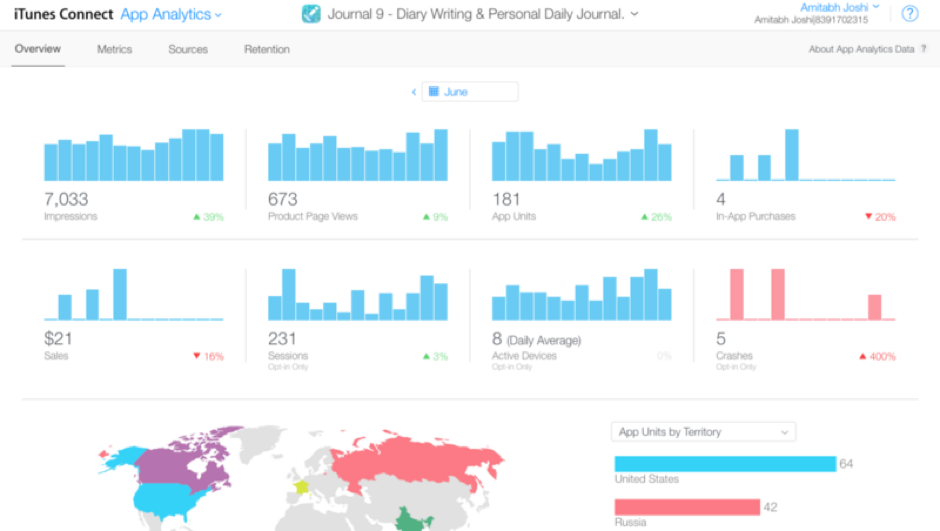
There is currently a set of fairly powerful tools on the market that allows you to monitor the metrics that determine an app’s success with users: downloads,reviews, revenue, and others. Some are free, others have a freemium model (a free version and other paying versions with additional features), some only need to be downloaded, while others require developers to integrate a SDK in the app.
The two most important tools for tracking apps are the solutions provided by the app stores themselves: App Analytics for the iOS operating system and the App Store, and Google Play Developers Console for apps in Android published on Google Play. In both cases the metrics they offer are very all-inclusive: traffic, user engagement and loyalty, download rates by segment, information on crashes or errors, marketing campaigns… An excellent resource for developers. However, they are not the only ones: Mobile Action, Sensor Tower and App Figures are another three examples of platforms that can help shine a light on the places that may be key for the future success of this type of products.
If you want to read more articles about apps, click here
Banco Bilbao Vizcaya Argentaria, S.A. owner of this portal uses cookies and/or similar technologies of its own and third parties for the purposes of personalization, analytics, behavioral advertising or advertising related to your preferences based on a profile prepared from your browsing habits (e.g. pages visited). If you wish to obtain more detailed information, consult our Cookies Policy.
Cookie settings panel
These are the advanced settings for first-party and third-party cookies. Here you can change the parameters that will affect your browsing experience on this website.
Technical Cookies (required)
These cookies are used to give you secure access to areas with personal information and to identify you when you log in.
Name
Owner
Duration
Description
gobp.lang
BBVA
1 month
Language preference
aceptarCookies
BBVA
1 year
Configuration Accepted Cookies
_abck
BBVA
1 year
Helps protect against malicious website attacks
bm_sz
BBVA
4 hours
Helps protect against malicious website attacks
ADRUM_BTs
Salesforce Marketing Cloud
Session
Required for monitoring of the service, inherent to SFMC
ADRUM_BT1
Salesforce Marketing Cloud
Session
Required for monitoring of the service, inherent to SFMC
ADRUM_BTa
Salesforce Marketing Cloud
Session
Required for monitoring of the service, inherent to SFMC
ADRUM_BT
Salesforce Marketing Cloud
Session
Required for monitoring of the service, inherent to SFMC
xt_0d95e
Salesforce Marketing Cloud
Session
Remember user preferences (if any)
__s9744cdb192d044faa1bf201d29fafd1e
Salesforce Marketing Cloud
Session
Remember user preferences (if any)
wpml_browser_redirect_test
WPML
Session
Text translation in the portal
wp-wpml_current_language
WPML
24 hours
Text translation in the portal
Analytics Cookies
They are used to track the activity or number of visits anonymously. Thanks to them we can constantly improve your browsing experience
Your browsing experience is constantly improving.
With your selection, we cannot offer you a continuously improved browsing experience.
Name
Owner
Duration
Description
AMCV_***
Adobe Analytics
Session
Unique Visitor IDs used in Cloud Marketing solutions
AMCVS_***
Adobe Analytics
2 years
Unique Visitor IDs used in Cloud Marketing solutions
demdex (safari)
Adobe Analytics
180 days
Create and store unique and persistent identifiers
sessionID
Adobe Analytics
Session
Launch's internal cookie used to identify the user
gpv_URL
Adobe Analytics
Session
Adobe Analytics plugin: getPreviousValue Capture the value of a certain variable in the following page view, in this case the prop1
gpv_level1
Adobe Analytics
Session
Cookie used to store the DataLayer levl1 of the previous page.
gpv_pageIntent
Adobe Analytics
Session
Cookie used to store the pageIntent of the previous page.
gpv_pageName
Adobe Analytics
Session
Cookie used to store the pagename of the previous page.
aocs
Adobe Analytics
Session
Cookie that stores the first values collected at the beginning of a process.
TTC
Adobe Analytics
Session
Cookie used to store the time between the App Page Visit event and the App Completed event.
TTCL
Adobe Analytics
Session
Cookie used to store the time between the LogIn event and App Completed.
s_cc
Adobe Analytics
Session
Determine if cookies are active
s_hc
Adobe Analytics
Session
Cookie used by Adobe for analytical purposes
s_ht
Adobe Analytics
Session
Cookie used by Adobe for analytical purposes
s_nr
Adobe Analytics
2 years
Determine the number of user visits
s_ppv
Adobe Analytics
Permanent
Adobe Analytics plugin: getPercentPageViewed Determine what percentage of the page a user views
s_sq
Adobe Analytics
Session
ClickMap/ActivityMap features
s_tp
Adobe Analytics
Session
Cookie used by Adobe for analytical purposes
s_visit
Adobe Analytics
2 years
Cookie used by Adobe to know when a session has been started.
Advertising Cookies
They allow the advertising shown to you to be customized and relevant to you. Thanks to these cookies, you will not see ads that you are not interested in.
The advertising is customized to you and your preferences.
Your choice means you will not see customized ads, only generic ones.
Name
Owner
Duration
Description
OT2
VersaTag
90 days
VersaTag Cookie used to store a user id and the number of user visits.
u2
VersaTag
90 days
VersaTag Cookie where the user ID is stored
TargetingInfo 2
MediaMind
1 year
Cookie that serves to assign a unique random number that generates MediaMind.
Customization Cookies
These cookies are related to general features such as the browser you use.
Your experience and content have been customized.
With your selection, we cannot offer you a continuously improved browsing experience.
Name
Owner
Duration
Description
mbox
Adobe Target
9 days
Cookie used by Adobe Target to test user experience customization.
Looks like you’re browsing from MexicoSpainArgentinaPeruColombiaBelgiumChileUSAFranceHong KongItalyPortugalUnited KingdomTurkeyUruguayVenezuelaAlemania, so let’s show you the custom content for your
location. Change
Select a country
In order to access the private area and corresponding sandbox, select the country of the APIs you want to use.